

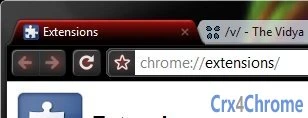
Description
Download Chrome Ibis RED – Browser Themes, Chrome Themes, Google Chrome
Overview
Chrome Ibis RED is a visually striking browser theme designed for Google Chrome, offering a vibrant red aesthetic with Aero interface integration. The theme was developed in response to user feedback on a previous design, Purple Night (Aero), indicating a growing demand for customizable, system-integrated visual experiences. It is tailored for users who appreciate aesthetic personalization and seek a more immersive browsing environment. The theme enhances the Chrome interface with a bold red color scheme, optimized for Windows 7 and Windows Vista, where Aero effects are enabled by default. This makes it particularly appealing to users of older Windows systems who still value visual polish and a modern look despite their operating system's age. Real-world usage includes daily browsing, web development workflows, and general desktop customization. The theme does not alter browser functionality but focuses on visual appeal and user comfort through color harmony and design consistency.
Key Features & Capabilities
- Red Color Theme – A bold, vibrant red design applied across Chrome’s toolbar, tabs, and navigation elements for a dynamic visual experience.
- Aero Integration – Designed to work seamlessly with Windows Aero, ensuring smooth transparency and visual effects on compatible systems.
- System Compatibility – Optimized for Windows 7 and Windows Vista, leveraging native graphical enhancements for a polished appearance.
- Default Aero Activation – The theme enables Aero effects by default, enhancing the overall visual experience without requiring manual configuration.
- Lightweight Design – At only 1.0 MB, the theme imposes minimal impact on system resources, ensuring fast loading and efficient operation.
Users can apply the theme to personalize their browsing interface, making it ideal for those who want a distinctive look while maintaining full functionality. The integration with Aero effects provides a more cohesive desktop experience, especially for users who prefer a unified visual language across their operating system and browser. This theme is particularly useful for users with older systems who still wish to enjoy modern UI aesthetics without upgrading hardware or software.
User Interface, Workflow & Performance
The user interface of Chrome Ibis RED is entirely contained within Chrome’s theme engine, meaning no additional panels or controls are introduced. Navigation remains unchanged, preserving the familiar Chrome workflow. Users can apply the theme through Chrome’s standard settings menu, ensuring a seamless setup process. The theme enhances visual elements such as the address bar, tab strip, and toolbar with consistent red coloring, while maintaining readability and accessibility. No performance metrics were specified by the developer, but given its lightweight size and lack of background processes, it is expected to have negligible impact on CPU or memory usage. The developer did not specify resource usage details. Stability is assumed to be high, as the theme operates within Chrome’s established theme framework. No known conflicts with other extensions were reported. General performance observations are based on typical behavior of similar browser themes.
Compatibility & System Requirements
Chrome Ibis RED is designed specifically for Windows 7 and Windows Vista, with full compatibility confirmed for both operating systems. The theme requires Google Chrome to be installed, though the exact version is not specified. Installation size is 1.0 MB, indicating a minimal footprint. The developer did not provide additional system requirements. Compatibility information was partially provided. Users should ensure that Aero effects are enabled in their system settings to fully experience the theme’s intended visual design. On systems where Aero is disabled or unsupported, the theme will still apply the red color scheme but may lack transparency and glass-like effects. The theme does not support macOS or newer versions of Windows.
Pros and Cons
Pros
- Bold, eye-catching red design enhances visual appeal
- Seamless integration with Windows Aero for a polished look
- Lightweight at just 1.0 MB, minimal system impact
- Easy to install and apply through Chrome settings
- Designed for older systems, ideal for Windows 7/Vista users
Cons
- Not compatible with macOS or newer Windows versions
- No advanced customization options beyond color
- Dependent on Aero effects for full visual impact
- Does not include functionality beyond visual styling
- Developer did not provide detailed technical specifications
FAQ Section
Is Chrome Ibis RED compatible with Windows 10 or Windows 11?
The theme is designed for Windows 7 and Windows Vista. It may not function properly on newer Windows versions due to changes in the Aero interface.
Can I use this theme on macOS?
No, the theme is only compatible with Windows 7 and Windows Vista. There is no version available for macOS.
Is the theme free to download and use?
Yes, Chrome Ibis RED is available at no cost. It is a free browser theme with no hidden fees or subscription models.
Does this theme affect browser performance?
Given its small size and lack of background processes, the theme is expected to have minimal impact on performance. The developer did not specify resource usage details.
How do I install Chrome Ibis RED?
To install, open Chrome, go to the theme’s download page, and click “Add to Chrome.” The theme will be applied automatically. No additional steps are required.
Final Thoughts + CTA
Chrome Ibis RED delivers a focused, visually engaging experience for users of Windows 7 and Windows Vista who value aesthetic customization. Its bold red design, combined with Aero integration, provides a modern and immersive look that stands out on older systems. While it lacks advanced features or customization, its simplicity and lightweight nature make it a reliable choice for users seeking a distinctive browser theme without compromising performance. It is especially well-suited for those who want to enhance their browsing interface with minimal effort. For fans of bold visuals and retro-futuristic design, this theme offers a satisfying touch of personality. Download Chrome Ibis RED now.
Guides & Tutorials for Chrome Ibis RED (Aero) Theme for Chrome
How to install Chrome Ibis RED (Aero) Theme for Chrome
- Click the Preview / Download button above.
- Once redirected, accept the terms and click Install.
- Wait for the Chrome Ibis RED (Aero) Theme for Chrome download to finish on your device.
How to use Chrome Ibis RED (Aero) Theme for Chrome
This software is primarily used for its core features described above. Open the app after installation to explore its capabilities.
User Reviews for Chrome Ibis RED (Aero) Theme for Chrome 0
No reviews found





